




Blog

  • BandejApp


    Release License
    Status

    AboutDocumentationDevelopmentTechnologiesLayoutAuthorsCertificationsLicense
    Português (BR)English


    💻 About the Project

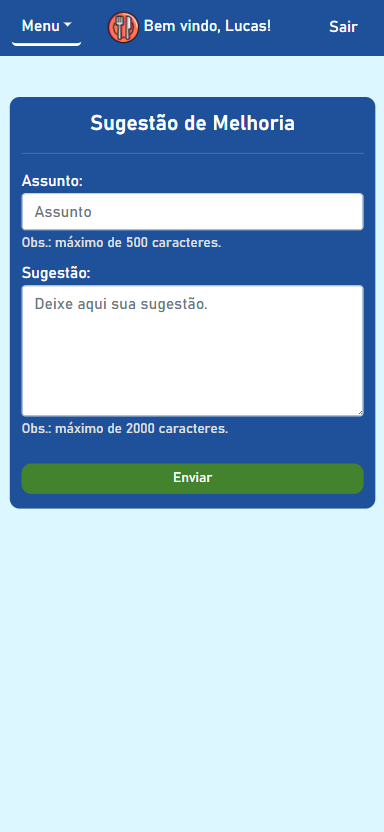
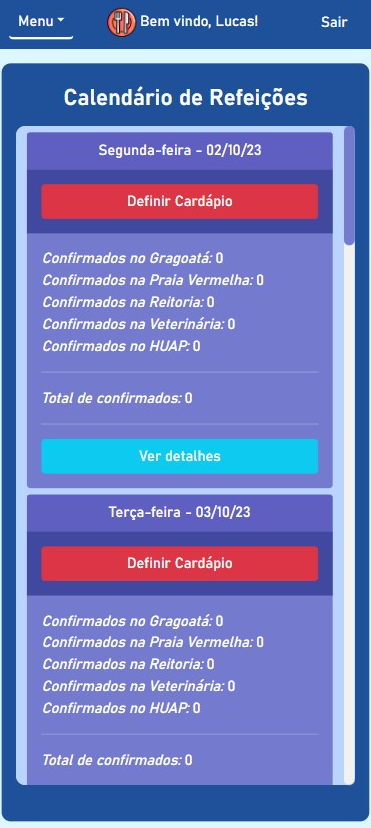
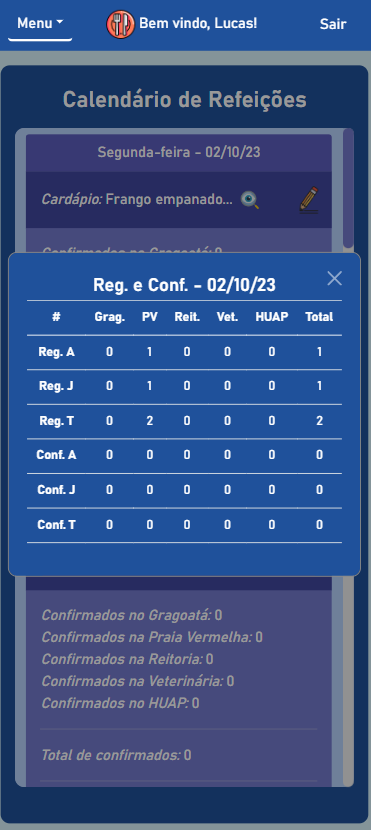
    BandejApp is a management system for university restaurants designed to reduce food waste by providing more efficient management. The application allows users to pre-register their meals, confirm attendance, evaluate service quality, and submit improvement suggestions. Administrators have access to detailed data on the number of people who registered and confirmed their attendance, enabling better planning of the food quantities to be prepared and redistributed among the university restaurant’s units. Additionally, administrators can publish announcements and view user suggestions and reviews.

    This project was conceived by Letícia de Oliveira Gago and, under the guidance of Flávio Luiz Seixas, several meetings were conducted to develop a technological solution to reduce food waste in university restaurants, ultimately leading to the creation of BandejApp. After the application was fully operational, a usability test was conducted using the SUS (System Usability Scale), which yielded satisfactory results. (more details).

    The project was presented to the Superintendency of Information Technology at the Fluminense Federal University for incorporation into the university restaurant’s official application. Currently, this integration is in the implementation phase.

    Project available at: https://bandejapp.infinityfreeapp.com.

    📋 Documentation

    🧑🏻‍💻 Development

    🛠 Technologies

    Website (PHP + Laravel)

    For more details on the project’s configurations, refer to composer.json.

    Database

    Hosting

    Services and Add-ons

    Utilities

    🎨 Layout

    The application layout is available on Figma:

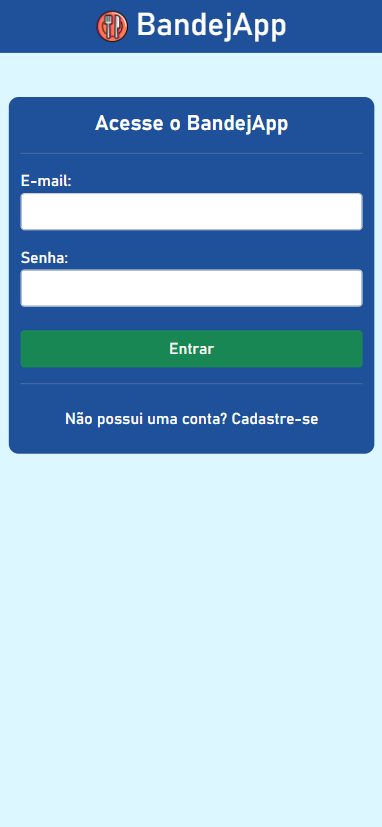
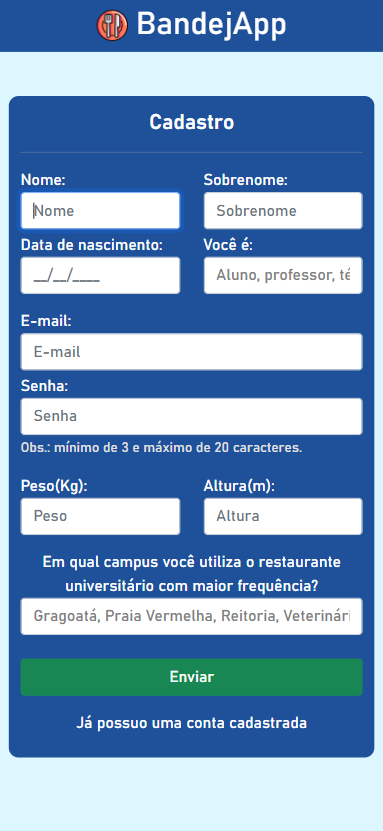
    Authentication Screens (Mobile)


    Login

    Sign up

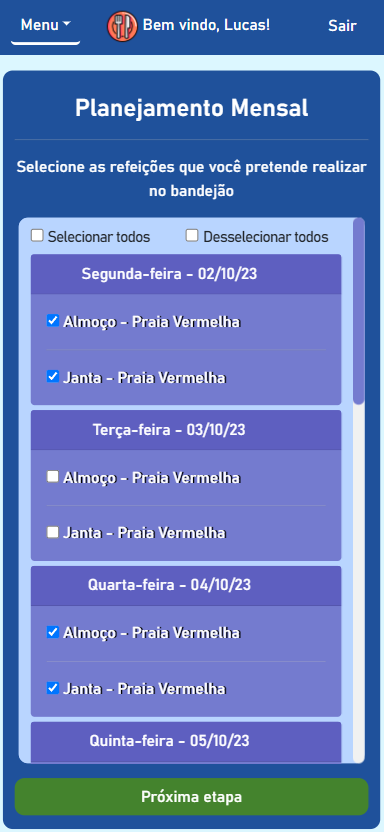
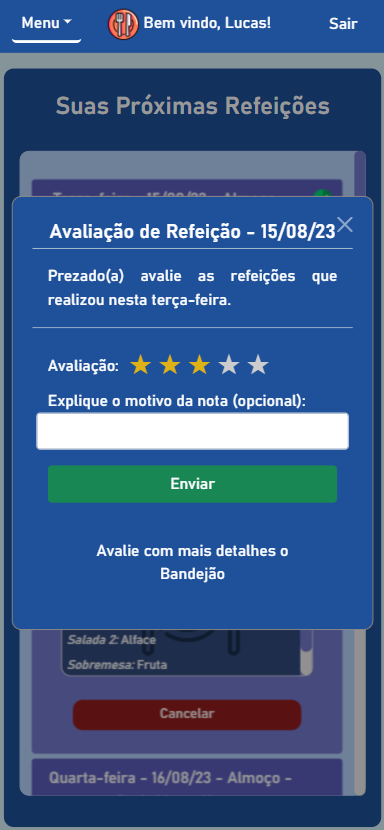
    User Screens (Mobile)


    Monthly planning (register meals)

    Dashboard (upcoming meals)

    Meal review

    Improvement suggestions

    Informative notices

    Menu (user)

    Admin Screens (Mobile)


    Dashboard (menus not defined)

    Table of registered and confirmed users

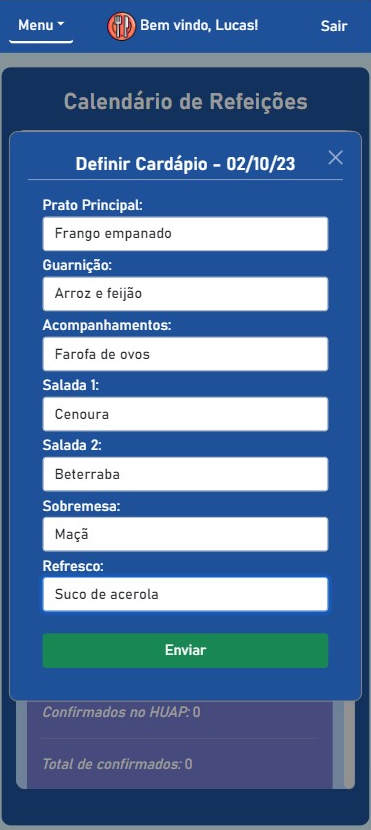
    Menu definition

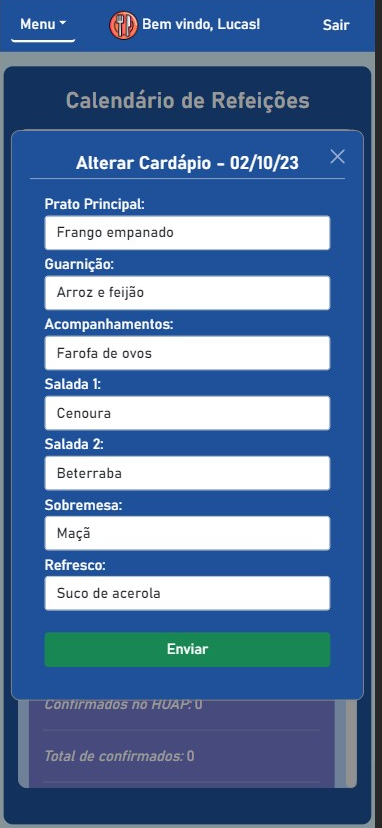
    Menu editing

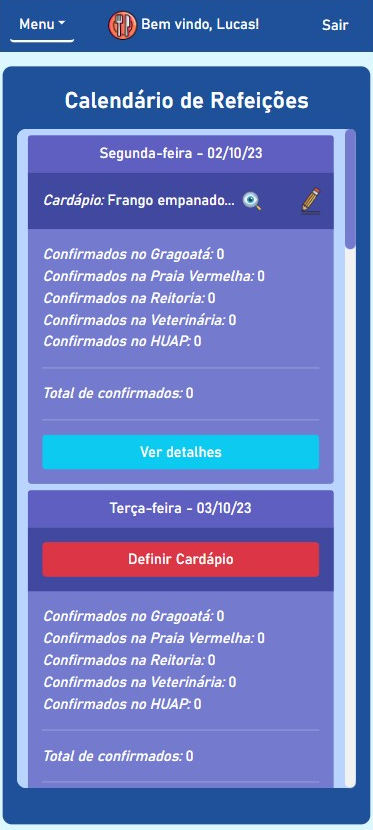
    Dashboard (menu set)

    Menu viewing

    Notice publishing

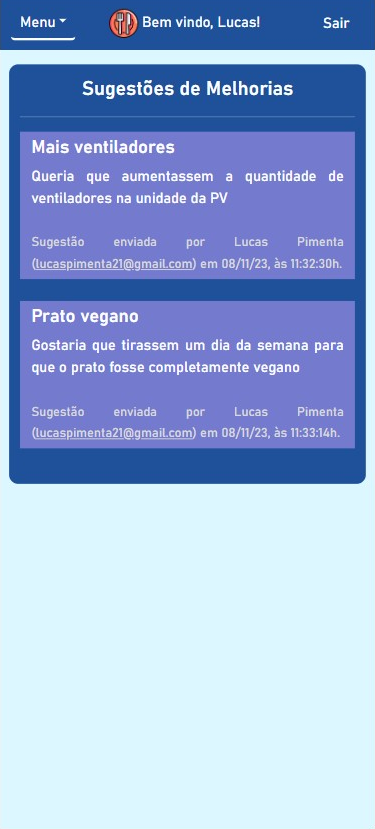
    Improvement suggestions

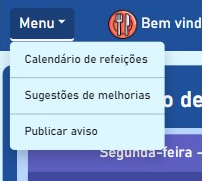
    Menu (admin)

    ✒ Authors

    Lucas Pimenta
    Lucas Pimenta
    Letícia Gago
    Letícia Gago
    Flávio Seixas
    Flávio Seixas

    📜 Certifications

    This software is protected by copyright, according to the following certifications issued by INPI:

    📝 License

    This project is licensed under the GNU Affero General Public License v3.0 (AGPLv3).

    Visit original content creator repository
  • peer-base

    peer-base

    Build real-time collaborative DApps on top of IPFS

    Build Status Greenkeeper badge made by Protocol Labs

    Documentation

    Install

    $ npm install peer-base

    Import

    const PeerBase = require('peer-base')

    API

    API docs

    Run example app

    Clone this repo.

    $ cd peer-base
    $ cd examples/react-app
    $ npm install

    In a different window, on the same dir, start the rendezvous server:

    $ npm run start:rv

    In a different window, on the same dir, run the app server:

    $ npm start

    Open http://localhost:3000 and test the app.

    Tests

    Clone this repo and run:

    $ npm install
    $ npm test
    

    Testing a deployed pinner

    If you want to make sure your deployed pinner is working correctly, there is a utility-test that you can run with npm run test:post-deploy that will ensure your deployed pinner works correctly.

    First you need to export environment variables to ensure the assertion values are correct for your environment, then you can run the test. Example:

    export PEER_BASE_APP_NAME=peer-pad/2
    export PEER_BASE_SWARM_ADDRESS=/dns4/localhost/tcp/9090/ws/p2p-websocket-star
    export PEER_BASE_PINNER_ID=Qmb9WDZUnUzEmZwkbMMGi4cV65F1sqcQa49dfZy9baRBJo
    npm run test:post-deploy
    

    Infrastructure

    The infrastructure for peer-base and related applications is managed via https://github.com/peer-base/peer-base/

    Debug

    You can activate the debugging logs by manipulating the DEBUG environment variable. Example:

    $ DEBUG=peer-star:* npm test

    For file-specific DEBUG values, see the source code and look for usages of the debug package.

    Lead Maintainer

    Jim Pick

    Contribute

    Peer-base and the IPFS implementation in JavaScript is a work in progress. As such, there’s a few things you can do right now to help out:

    • Check out existing issues. This would be especially useful for modules in active development. Some knowledge of IPFS may be required, as well as the infrastructure behind it – for instance, you may need to read up on p2p and more complex operations like muxing to be able to help technically.
    • Perform code reviews. More eyes will help (a) speed the project along, (b) ensure quality, and (c) reduce possible future bugs.
    • Add tests. There can never be enough tests.

    Want to hack on peer-base?

    License

    MIT

    Visit original content creator repository
  • todomvc

    Getting Started with Create React App

    This project was bootstrapped with Create React App.

    Available Scripts

    In the project directory, you can run:

    yarn start

    Runs the app in the development mode.
    Open http://localhost:3000 to view it in the browser.

    The page will reload if you make edits.
    You will also see any lint errors in the console.

    yarn test:unit

    Launches the test runner in the interactive watch mode.
    See the section about running tests for more information.

    yarn build

    Builds the app for production to the build folder.
    It correctly bundles React in production mode and optimizes the build for the best performance.

    The build is minified and the filenames include the hashes.
    Your app is ready to be deployed!

    See the section about deployment for more information.

    yarn eject

    Note: this is a one-way operation. Once you eject, you can’t go back!

    If you aren’t satisfied with the build tool and configuration choices, you can eject at any time. This command will remove the single build dependency from your project.

    Instead, it will copy all the configuration files and the transitive dependencies (webpack, Babel, ESLint, etc) right into your project so you have full control over them. All of the commands except eject will still work, but they will point to the copied scripts so you can tweak them. At this point you’re on your own.

    You don’t have to ever use eject. The curated feature set is suitable for small and middle deployments, and you shouldn’t feel obligated to use this feature. However we understand that this tool wouldn’t be useful if you couldn’t customize it when you are ready for it.

    Learn More

    You can learn more in the Create React App documentation.

    To learn React, check out the React documentation.

    Visit original content creator repository

  • data-portfolio

    Data Analysis Portfolio

    This is my professional data analysis portfolio. You can check out my work using the links below.

    Visualizations and Analitycs

    Why use BigQuery? Analyzing billions of CNPJ (Brazilian business registration numbers) data and creating an attractiveness index for establishments by census tract in Brazil.

    What is the difference in the value of square meters between the neighborhoods in São Paulo?

    Where does Brazilian soy come from and where does it go?

    What are the main financial institutions for credit operations in Brazil?

    How many enslaved people disembarked in Brazil throughout history?

    How do schools in Ceará perform in Mathematics?

    Has the coverage of basic health services kept up with the population growth in your state?

    Are there enough pediatric clinics in the Legal Amazon to meet the needs of its child population?

    The relationship between the HDI and the 2018 presidential vote in the state of São Paulo, Brazil

    Map of the Structural Condition of Public Squares in Campinas
    Conducted on-site experience analysis of public squares in Campinas with an area greater than 1000m² for social investments and hosting major events.
    Tools: QGIS (Spatial Analysis), R (Statistical Analysis and ETL)

    Map of Violence in Campinas, São Paulo, Brazil, from 2011 to 2017
    Experience analyzing a dataset from Policia Civil of the São Paulo State with a focus on spatial analysis of youth homicides in the city of Campinas. Tools: QGIS (Spatial Analysis), R (Statistical Analysis and ETL)

    MapOrganico – A map that displays the locations of organic food retailers in the state of São Paulo, Brazil
    Tools: QGIS (Geoservices, Spatial Data ETL), Google Maps/Sheets

    Spatial Data Infrastructure of Embrapa
    Experience working with spatial metadata (ISO 19115) and conducting spatial analysis for the company.
    Tools: QGIS (Geoservices and Geoprocessing), R (ETL and Statistical Analysis)

    ETLs

    Geospatial ETL

    Visit original content creator repository

  • mermaid-cheatsheet-ja

    Mermaid チートシート

    Mermaid の日本語チートシートです。

    GitHub の Markdown のコードブロックで Mermaid シンタックスが使えるようになりました。

    公式 README のサンプル

    フローチャート

    flowchart LR
        A[ハード] -->|テキスト| B(ラウンド)
        B --> C{判断}
        C -->|1| D[結果 1]
        C -->|2| E[結果 2]
    

    flowchart LR
        A[ハード] -->|テキスト| B(ラウンド)
        B --> C{判断}
        C -->|1| D[結果 1]
        C -->|2| E[結果 2]


    Loading


    シーケンス図

    sequenceDiagram
        アリス->>ジョン: やぁ、ジョン、調子はどう?
        loop ヘルスチェック
            ジョン->>ジョン: 心気症との闘い
        end
        Note right of ジョン: 合理的な思考
        ジョン-->>アリス: いいよ!
        ジョン->>ボブ: 調子はどう?
        ボブ-->>ジョン: ばっちりよ!
    

    sequenceDiagram
        アリス->>ジョン: やぁ、ジョン、調子はどう?
        loop ヘルスチェック
            ジョン->>ジョン: 心気症との闘い
        end
        Note right of ジョン: 合理的な思考
        ジョン-->>アリス: いいよ!
        ジョン->>ボブ: 調子はどう?
        ボブ-->>ジョン: ばっちりよ!


    Loading


    ガントチャート

    gantt
        dateFormat  YYYY-MM-DD
        title GANNT チャートを mermaid に追加
        excludes weekdays 2014-01-10
    
        section セクション
        完了タスク            :done,    des1, 2014-01-06,2014-01-08
        アクティブタスク               :active,  des2, 2014-01-09, 3d
        未来のタスク               :         des3, after des2, 5d
        未来のタスク 2               :         des4, after des3, 5d
    

    gantt
        dateFormat  YYYY-MM-DD
        title GANNT チャートを mermaid に追加
        excludes weekdays 2014-01-10
    
        section セクション
        完了タスク            :done,    des1, 2014-01-06,2014-01-08
        アクティブタスク               :active,  des2, 2014-01-09, 3d
        未来のタスク               :         des3, after des2, 5d
        未来のタスク 2               :         des4, after des3, 5d


    Loading


    クラス図

    classDiagram
        Animal <|-- Duck
        Animal <|-- Fish
        Animal <|-- Zebra
        Animal : +int age
        Animal : +String gender
        Animal: +isMammal()
        Animal: +mate()
        class Duck {
            +String beakColor
            +swim()
            +quack()
        }
        class Fish {
            -int sizeInFeet
            -canEat()
        }
        class Zebra {
            +bool is_wild
            +run()
        }
    

    classDiagram
        Animal <|-- Duck
        Animal <|-- Fish
        Animal <|-- Zebra
        Animal : +int age
        Animal : +String gender
        Animal: +isMammal()
        Animal: +mate()
        class Duck {
            +String beakColor
            +swim()
            +quack()
        }
        class Fish {
            -int sizeInFeet
            -canEat()
        }
        class Zebra {
            +bool is_wild
            +run()
        }


    Loading


    状態図

    stateDiagram-v2
        [*] --> 停止
        停止 --> [*]
        停止 --> 移動
        移動 --> 停止
        移動 --> 衝突
        衝突 --> [*]
    

    stateDiagram-v2
        [*] --> 停止
        停止 --> [*]
        停止 --> 移動
        移動 --> 停止
        移動 --> 衝突
        衝突 --> [*]


    Loading


    パイチャート(円グラフ)

    pie title ボランティアに迎えられたペット
        "犬" : 386
        "猫" : 85
        "ねずみ" : 15
    

    pie title ボランティアに迎えられたペット
        "犬" : 386
        "猫" : 85
        "ねずみ" : 15


    Loading


    Git グラフ

    gitGraph
       commit
       commit tag: "v1.0.0"
       branch develop
       commit
       commit
       commit
       checkout main
       commit
       commit
    

    gitGraph
       commit
       commit tag: "v1.0.0"
       branch develop
       commit
       commit
       commit
       checkout main
       commit
       commit


    Loading


    ユーザージャーニー図

    journey
        title 私の勤務日
        section 出勤
          お茶をいれる: 5: 私
          上の階にのぼる: 3: 私
          働く: 1: 私, 猫
        section 退勤
          下の階におりる: 5: 私
          座る: 3: 私
    

    journey
        title 私の勤務日
        section 出勤
          お茶をいれる: 5: 私
          上の階にのぼる: 3: 私
          働く: 1: 私, 猫
        section 退勤
          下の階におりる: 5: 私
          座る: 3: 私


    Loading


    REAMDE にサンプルの無いもの

    ER 図

    erDiagram
        CUSTOMER ||--o{ ORDER : "入れる"
        ORDER ||--|{ LINE-ITEM : "含む"
        CUSTOMER }|..|{ DELIVERY-ADDRESS : "使う"
    

    erDiagram
        CUSTOMER ||--o{ ORDER : "入れる"
        ORDER ||--|{ LINE-ITEM : "含む"
        CUSTOMER }|..|{ DELIVERY-ADDRESS : "使う"


    Loading


    erDiagram
        CUSTOMER ||--o{ ORDER : "入れる"
        CUSTOMER {
            string name
            string custNumber
            string sector
        }
        ORDER ||--|{ LINE-ITEM : "含む"
        ORDER {
            int orderNumber
            string deliveryAddress
        }
        LINE-ITEM {
            string productCode
            int quantity
            float pricePerUnit
        }
    

    erDiagram
        CUSTOMER ||--o{ ORDER : "入れる"
        CUSTOMER {
            string name
            string custNumber
            string sector
        }
        ORDER ||--|{ LINE-ITEM : "含む"
        ORDER {
            int orderNumber
            string deliveryAddress
        }
        LINE-ITEM {
            string productCode
            int quantity
            float pricePerUnit
        }


    Loading


    複雑なサンプル:

    erDiagram
        CAR ||--o{ NAMED-DRIVER : "許可する"
        CAR {
            string allowedDriver FK "許可されたドライバーのライセンス"
            string registrationNumber
            string make
            string model
        }
        PERSON ||--o{ NAMED-DRIVER : "である"
        PERSON {
            string driversLicense PK "ライセンスナンバー"
            string firstName
            string lastName
            int age
        }
    

    erDiagram
        CAR ||--o{ NAMED-DRIVER : "許可する"
        CAR {
            string allowedDriver FK "許可されたドライバーのライセンス"
            string registrationNumber
            string make
            string model
        }
        PERSON ||--o{ NAMED-DRIVER : "である"
        PERSON {
            string driversLicense PK "ライセンスナンバー"
            string firstName
            string lastName
            int age
        }


    Loading


    ※エンティティ名は日本語にすると描画に失敗するため英語のまま

    要件図

    requirementDiagram
        requirement "テスト要件" {
            id: 1
            text: "テストテキスト。"
            risk: high
            verifymethod: test
        }
    
        element "テストエンティティ" {
            type: "シミュレーション"
        }
    
        "テストエンティティ" - satisfies -> "テスト要件"
    

    requirementDiagram
        requirement "テスト要件" {
            id: 1
            text: "テストテキスト。"
            risk: high
            verifymethod: test
        }
    
        element "テストエンティティ" {
            type: simulation
        }
    
        "テストエンティティ" - satisfies -> "テスト要件"


    Loading


    Mermaid 公式

    Visit original content creator repository

  • Competitive-Wikipedia

    🏁 Competitive Wikipedia

    ⏱ A race against time, in the format of Wikipedia.

    View Demo .
    Report Bug .
    Request Feature

    👀 About The Project

    You might be suprised to learn about Wikipedia Speedruns, where the goal is to get from a starting article to a target article in the shortest amount of clicks and time possible. Although Wikipedia Speedrun websites exist, this project seeks to “gameify” the Wikipedia experience whilst simultaneously allowing users to familiarise themselves with wiki structures and find information more efficiently.

    Some of the features that set Competitive Wikipedia apart are:

    • A truly fair speedrun clock that account for loading times and has a pause function
    • Anti-cheat measures, such as control/f or cmd/f attempts and inspector injects (potentially)
    • A competitive environment, with both local and online leaderboards, as well as shops where players can purchase buffs and advantages

    Built With

    Roadmap

    • Random link generation
    • Redirection
    • UI design
    • Shop
    • Timer logic (WIP)
      • Auto Start
      • Auto Stop

    See the open issues for a full list of proposed features (and known issues).

    Contributing

    Contributions are what make the open source community such an amazing place to learn, inspire, and create. Any contributions you make are greatly appreciated.

    If you have a suggestion that would make this better, please fork the repo and create a pull request. You can also simply open an issue with the tag “enhancement”.
    Don’t forget to give the project a star! Thanks again!

    1. Fork the Project
    2. Create your Feature Branch (git checkout -b feature/YourFeature)
    3. Commit your Changes (git commit -m 'Add YourFeature')
    4. Push to the Branch (git push origin feature/YourFeature)
    5. Open a Pull Request

    License

    Distributed under the MIT License. See MIT License for more information.

    Contact

    Your Name – @theres13letterskaisert2027@student.cis.edu.hk

    Project Link: [placeholderlink)

    Acknowledgments

    A project for Year 11 (24-25) Semester 1 Computer Science, at CIS.

    Visit original content creator repository

  • social-links-profile

    Frontend Mentor – Social links profile

    Design preview for the Social links profile coding challenge

    Welcome! 👋

    Thanks for checking out this front-end coding challenge.

    Frontend Mentor challenges help you improve your coding skills by building realistic projects.

    To do this challenge, you need a basic understanding of HTML and CSS.

    The challenge

    Your challenge is to build out this social links profile and get it looking as close to the design as possible.

    You can use any tools you like to help you complete the challenge. So if you’ve got something you’d like to practice, feel free to give it a go.

    Your users should be able to:

    • See hover and focus states for all interactive elements on the page

    Want some support on the challenge? Join our community and ask questions in the #help channel.

    Where to find everything

    Your task is to build out the project to the designs inside the /design folder. You will find both a mobile and a desktop version of the design.

    The designs are in JPG static format. Using JPGs will mean that you’ll need to use your best judgment for styles such as font-size, padding and margin.

    If you would like the design files (we provide Sketch & Figma versions) to inspect the design in more detail, you can subscribe as a PRO member.

    All the required assets for this project are in the /assets folder. The images are already exported for the correct screen size and optimized.

    We also include variable and static font files for the required fonts for this project. You can choose to either link to Google Fonts or use the local font files to host the fonts yourself. Note that we’ve removed the static font files for the font weights that aren’t needed for this project.

    There is also a style-guide.md file containing the information you’ll need, such as color palette and fonts.

    Building your project

    Feel free to use any workflow that you feel comfortable with. Below is a suggested process, but do not feel like you need to follow these steps:

    1. Initialize your project as a public repository on GitHub. Creating a repo will make it easier to share your code with the community if you need help. If you’re not sure how to do this, have a read-through of this Try Git resource.
    2. Configure your repository to publish your code to a web address. This will also be useful if you need some help during a challenge as you can share the URL for your project with your repo URL. There are a number of ways to do this, and we provide some recommendations below.
    3. Look through the designs to start planning out how you’ll tackle the project. This step is crucial to help you think ahead for CSS classes to create reusable styles.
    4. Before adding any styles, structure your content with HTML. Writing your HTML first can help focus your attention on creating well-structured content.
    5. Write out the base styles for your project, including general content styles, such as font-family and font-size.
    6. Start adding styles to the top of the page and work down. Only move on to the next section once you’re happy you’ve completed the area you’re working on.

    Deploying your project

    As mentioned above, there are many ways to host your project for free. Our recommend hosts are:

    You can host your site using one of these solutions or any of our other trusted providers. Read more about our recommended and trusted hosts.

    Create a custom README.md

    We strongly recommend overwriting this README.md with a custom one. We’ve provided a template inside the README-template.md file in this starter code.

    The template provides a guide for what to add. A custom README will help you explain your project and reflect on your learnings. Please feel free to edit our template as much as you like.

    Once you’ve added your information to the template, delete this file and rename the README-template.md file to README.md. That will make it show up as your repository’s README file.

    Submitting your solution

    Submit your solution on the platform for the rest of the community to see. Follow our “Complete guide to submitting solutions” for tips on how to do this.

    Remember, if you’re looking for feedback on your solution, be sure to ask questions when submitting it. The more specific and detailed you are with your questions, the higher the chance you’ll get valuable feedback from the community.

    Sharing your solution

    There are multiple places you can share your solution:

    1. Share your solution page in the #finished-projects channel of our community.
    2. Tweet @frontendmentor and mention @frontendmentor, including the repo and live URLs in the tweet. We’d love to take a look at what you’ve built and help share it around.
    3. Share your solution on other social channels like LinkedIn.
    4. Blog about your experience building your project. Writing about your workflow, technical choices, and talking through your code is a brilliant way to reinforce what you’ve learned. Great platforms to write on are dev.to, Hashnode, and CodeNewbie.

    We provide templates to help you share your solution once you’ve submitted it on the platform. Please do edit them and include specific questions when you’re looking for feedback.

    The more specific you are with your questions the more likely it is that another member of the community will give you feedback.

    Got feedback for us?

    We love receiving feedback! We’re always looking to improve our challenges and our platform. So if you have anything you’d like to mention, please email hi[at]frontendmentor[dot]io.

    This challenge is completely free. Please share it with anyone who will find it useful for practice.

    Have fun building! 🚀

    Visit original content creator repository

  • kinopoisk-clone

    Медиатека на открытом API Кинопоиска

    Об этом проекте

    Это простое приложение для просмотра информации о фильмах, созданное с использованием React, TypeScript и открытого API Кинопоиска.

    Целью этого проекта является создание приложения для просмотра информации о фильмах, которое будет использовать React, TypeScript и открытое API Кинопоиска для получения данных о фильмах. Приложение будет иметь следующий функционал:

    1. Отображение списка фильмов:
      • Приложение отображает список фильмов, получаемых с помощью API.
      • Отображает фильмы постранично по 50 фильмов на страницу с возможность менять количество фильмов на странице.
      • Для каждого фильма отображено:
        • Постер фильма (если доступен).
        • Название фильма.
        • Год выпуска.
        • Рейтинг фильма.
    2. Есть возможность фильтровать список фильмов:
      • По жанру (выбор нескольких жанров)
      • По рейтингу (диапазон рейтинга).
      • По году выпуска (диапазон лет начиная с 1990).
    3. Просмотр детальной информации о фильме:
    • При клике на фильм из списка или результатов поиска, приложение переходит на страницу с детальной информацией об этом фильме.
    • На странице фильма отображено:
      • Постер фильма (если доступен).
      • Название фильма.
      • Описание фильма.
      • Рейтинг фильма.
      • Дату выхода.
      • Список жанров.

    Инструменты:

    TypeScript React React Router Redux Axios

    Дополнительные задания:

    • Есть возможность добавления фильмов в список “избранное”:
      • Отдельная страница со списком избранных фильмов.
      • Сохраняется список при перезагрузке страницы.

    Ожидаемый результат:

    • Рабочее многостраничное SPA приложение для просмотра информации о фильмах, удовлетворяющее всем перечисленным требованиям.

    Начало работы

    Чтобы запустить проект локально, необходимо выполнить следующие шаги:

    Предварительные требования

    • npm
    npm install npm@latest -g
    

    Установка: ручная

    1. Клонировать репозиторий
    git clone https://github.com/pamellix/kinopoisk-clone.git
    
    1. Перейдите в папку с приложением и установите NPM пакеты
    npm install
    
    1. Запустить приложение
    npm start
    

    Чтобы собрать build версию приложения, необходимо выполнить следующие команды:

    1. Установить NPM пакеты
    npm install
    
    1. Собрать build версию
    npm run build
    
    1. Запустить приложение
    npx serve -d build
    

    Установка: с помощью docker compose

    1. Клонировать репозиторий
    git clone https://github.com/pamellix/kinopoisk-clone.git
    
    1. Перейдите в папку с приложением и пропишите следующую команду
    docker compose up --build
    

    Лицензия

    Проект распространяется под лицензией MIT. Подробнее о лицензии можно узнать здесь: LICENSE.txt

    Visit original content creator repository
  • tailgate

    Tailgate

    Secure, zero-config ingress using Tailscale and Caddy.

    Tailgate allows you to expose containerized services privately over your Tailnet with automatic HTTPS. It bundles Tailscale, Caddy, and popular plugins into a single, easy-to-deploy container.

    Features

    • Private Ingress: Expose services securely via Tailscale without opening public ports.
    • Automatic HTTPS: Caddy manages certificates automatically.
    • Plugin Support: Includes Cloudflare DNS support out-of-the-box.
    • Sablier Integration: Optional support for Sablier to scale containers on demand (Scale-to-Zero).

    Available Images

    Image Tag Description
    valentemath/tailgate:latest Base image. Includes Tailscale, Caddy, and Cloudflare DNS plugin.
    valentemath/tailgate:latest-with-sablier Includes the Sablier Caddy plugin. The Sablier binary is downloaded automatically at runtime.

    Quick Start

    The recommended way to run Tailgate is via Docker Compose.

    1. Configure docker-compose.yaml

    services:
      tailgate:
        image: valentemath/tailgate:latest
        container_name: tailgate
        environment:
          - TAILSCALE_AUTHKEY=tskey-auth-kB...  # Required
          - TAILSCALE_HOSTNAME=tailgate         # Optional
          - CLOUDFLARE_API_TOKEN=...            # Optional (if using DNS challenges)
        volumes:
          - tailscale-state:/tailscale          # Persist Tailscale identity
          - ./Caddyfile:/etc/caddy/Caddyfile    # Mount your config
          - caddy-data:/data                    # Persist Caddy certificates
    
    volumes:
      tailscale-state:
      caddy-data:

    2. Create a Caddyfile

    Create a Caddyfile in the same directory. Tailgate will serve this configuration over your Tailnet.

    # Example: Reverse proxy a service on your Tailnet
    machine-name.tailnet-name.ts.net {
        reverse_proxy other-container:80
    }

    3. Deploy

    docker compose up -d

    Configuration

    Tailscale

    Variable Description Default
    TAILSCALE_AUTHKEY Required. Your Tailscale Auth Key.
    TAILSCALE_HOSTNAME The hostname for this node on your Tailnet. tailgate
    TAILNET_NAME Your Tailnet name (required for some MagicDNS setups).

    Caddy

    Variable Description Default
    CADDY_WATCH Set to true to auto-reload Caddy when the Caddyfile changes. false
    CADDY_PORT The port for Caddy’s admin API (used for healthchecks). 2019
    CLOUDFLARE_API_TOKEN Token for Cloudflare DNS challenges.

    Sablier (Scale-to-Zero)

    Only applicable when using the latest-with-sablier image.

    Variable Description Default
    INCLUDE_SABLIER Set to true to download and start the Sablier binary. true
    SABLIER_VERSION The version of Sablier to download. 1.10.1
    SABLIER_PORT The port Sablier listens on. 10000

    Note on Sablier:
    When using the -with-sablier image, the Sablier binary is downloaded at runtime if INCLUDE_SABLIER is set to true. You must mount a configuration file to /etc/sablier/sablier.yml and provide access to the Docker socket.

    services:
      tailgate:
        image: valentemath/tailgate:latest-with-sablier
        volumes:
          - ./sablier.yml:/etc/sablier/sablier.yml
          - /var/run/docker.sock:/var/run/docker.sock:ro

    Building Custom Images

    If you need Caddy plugins other than Cloudflare or Sablier, you can build your own image using the provided Dockerfile.

    1. Clone the repository.
    2. Modify docker-compose.yaml:
      Update the PLUGINS build argument to include the Go import paths of the plugins you need.

      build:
        context: .
        args:
          PLUGINS: "github.com/caddy-dns/duckdns github.com/caddy-dns/route53"
    3. Build and Run:
      docker compose up -d --build

    Credits

    Visit original content creator repository

  • esus_thrift_mapped_conversion

    Esus Thrift Mapped Conversion

    Lib for mapping data for integrate data with ESUS through Apache Thrift.

    Example:

    package br.com.juliocnsouza.ezyertoesus.exemple.real;
    
    import br.com.juliocnsouza.ezyertoesus.converter.Conversor;
    import br.com.juliocnsouza.ezyertoesus.envio.InformacoesEnvioDto;
    import br.com.juliocnsouza.ezyertoesus.envio.ThriftSerializer;
    import br.com.juliocnsouza.ezyertoesus.envio.ZipWriter;
    import br.gov.saude.esus.cds.transport.generated.thrift.procedimento.FichaProcedimentoMasterThrift;
    import br.gov.saude.esus.transport.common.api.configuracaodestino.VersaoThrift;
    import br.gov.saude.esus.transport.common.generated.thrift.DadoInstalacaoThrift;
    import br.gov.saude.esus.transport.common.generated.thrift.DadoTransporteThrift;
    import java.lang.reflect.InvocationTargetException;
    import java.util.Arrays;
    import java.util.Random;
    
    /**
     * ExemploDadosParaThrift.java -> Job:
     * <p>
     * @since 23/09/2015
     * @version 1.0
     * @author Julio Cesar Nunes de Souza (juliocnsouzadev@gmail.com)
     */
    public class ExemploDadosParaThrift {
    
        public static void main( String[] args )
                throws Exception {
    
            // Passo 5: serializar o thrift de transporte e gerar o arquivo zip;
            ZipWriter.generateZip( Arrays.asList( get() , get() , get() ) ,
                                   "exemploConversaoThrift.zip" );
        }
    
        private static DadoTransporteThrift get()
                throws IllegalAccessException ,
                       InstantiationException ,
                       InvocationTargetException ,
                       IllegalArgumentException ,
                       NoSuchMethodException {
            // Passo 1: criar e preencher o thrift do atendimento;
    
            FichaProcedimentoMinhaAplicacao ficha = getFichaProcedimentoExemplo();
            Conversor<FichaProcedimentoMasterThrift> conversor = new Conversor<>( ficha );
            FichaProcedimentoMasterThrift fichaThrift = conversor.get();
            // Passo 2: serializar o thrift do atendimento;
            byte[] dadoSerializado = ThriftSerializer.serialize( fichaThrift );
            // Passo 3: coletar as informações do envio e das instalações;
            InformacoesEnvioDto informacoesEnvioDto = new InformacoesEnvioDto();
            informacoesEnvioDto.setTipoDadoSerializado( new Random().nextLong() );
            informacoesEnvioDto.setDadoSerializado( dadoSerializado );
            informacoesEnvioDto.setUuidDadoSerializado( ficha.getUuidFicha() );
            informacoesEnvioDto.setCnesDadoSerializado( "32432432" );
            informacoesEnvioDto.setCodIbge( "323132" );
            informacoesEnvioDto.setIneDadoSerializado( "32433243" );
            // Passo 4: preencher o thrift de transporte com as informações coletadas; -- fazer builder
            DadoTransporteThrift dadoTransporteThrift = getInfoInstalacao( informacoesEnvioDto );
            return dadoTransporteThrift;
        }
    
        private static FichaProcedimentoMinhaAplicacao getFichaProcedimentoExemplo() {
            FichaProcedimentoMinhaAplicacao ficha = new FichaProcedimentoMinhaAplicacao();
            ficha.setAltura( 170 );
            ficha.setClicemia( 12 );
            ficha.setColeta( 11 );
            ficha.setCurativos( 1 );
            ficha.setPa( 12 );
            ficha.setPeso( 9 );
            ficha.setTemperatura( 2 );
            ficha.setTipoCds( 1 );
            return ficha;
        }
    
        public static DadoTransporteThrift getInfoInstalacao( InformacoesEnvioDto informacoesEnvioDto ) {
            DadoTransporteThrift dadoTransporteThrift = new DadoTransporteThrift();
    
            // Obrigatórios;
            dadoTransporteThrift.setCnesDadoSerializado( informacoesEnvioDto.getCnesDadoSerializado() );
            dadoTransporteThrift.setDadoSerializado( informacoesEnvioDto.getDadoSerializado() );
    
            DadoInstalacaoThrift originadora = new DadoInstalacaoThrift();
            originadora.setContraChave( "123456" );
            originadora.setCpfOuCnpj( "11111111111" );
            originadora.setEmail( "a@b.com" );
            originadora.setFone( "999999999" );
            originadora.setNomeOuRazaoSocial( "Nome ou Razao Social Originadora" );
            originadora.setUuidInstalacao( "UUIDUNICO111" );
            dadoTransporteThrift.setOriginadora( originadora );
    
            DadoInstalacaoThrift remetente = new DadoInstalacaoThrift();
            remetente.setContraChave( "789010" );
            remetente.setCpfOuCnpj( "11111111111" );
            remetente.setEmail( "b@a.com" );
            remetente.setFone( "98888888" );
            remetente.setNomeOuRazaoSocial( "Nome ou Razao Social Remetente" );
            remetente.setUuidInstalacao( "UUIDUNICO222" );
            dadoTransporteThrift.setRemetente( remetente );
    
            dadoTransporteThrift.setTipoDadoSerializado( informacoesEnvioDto.getTipoDadoSerializado() );
            dadoTransporteThrift.setUuidDadoSerializado( informacoesEnvioDto.getUuidDadoSerializado() );
    
            // Opcionais;
            String codIbge = informacoesEnvioDto.getCodIbge();
            dadoTransporteThrift.setCodIbge( codIbge == null
                                             ? ""
                                             : codIbge );
    
            String ineDadoSerializado = informacoesEnvioDto.getIneDadoSerializado();
            dadoTransporteThrift.setIneDadoSerializado( ineDadoSerializado == null
                                                        ? ""
                                                        : ineDadoSerializado );
    
            Long numLote = informacoesEnvioDto.getNumLote();
            dadoTransporteThrift.setNumLote( numLote == null
                                             ? 0l
                                             : numLote );
    
            VersaoThrift versaoThrift = new VersaoThrift();
            versaoThrift.setMajor( 1 );
            versaoThrift.setMinor( 0 );
            versaoThrift.setRevision( 0 );
            dadoTransporteThrift.setVersao( versaoThrift );
    
            return dadoTransporteThrift;
        }
    
    }


    Visit original content creator repository