This is a Ruby on Rails app running on Docker using Elastic Search, for a challenge by Instabug. (also using an Mysql DB and Redis server for caching purposes)
- Added use of Redis as a cache to hold recent queries (and appropriately make keys expire) between the Rails app and the Mysql server
- Updated Readme
- Fixed issue with waiting for MySQL and ElasticSearch components to be ready before running the Rails server, now this is automatically done during the docker project starting up, originally it was not.
- Updated Readme
- Ruby 2.5
- Rails 5.2
- Elasticsearch 5.3
- Mysql 5.6
- Redis 4.0
- Docker
- Your favorite API test tool, Postman is great
- Make sure
dockeranddocker-composeare installed - Clone repository
- Run the following command in the root folder of the repo
$ docker-compose build
This builds the docker containers needed.
Namely they are 4 main docker containers:
- The Rails app
- The Database app (in form of mysql container)
- The ElasticSearch app
- The Redis app
Note: If you are using a fresh docker installation, fetching the resources will download around half a gigabyte (mainly the ElasticSearch and the Rails libraries)
If you alreay have specific versions installed, you can choose to change the versions used. (in the files Dockerfile and Gemfile)
Then to run the application
$ docker-compose up -d
AND NOW YOU’RE READY!
If settings kept as default, rails server will run on http://localhost:3000 and hence append that with the paths in the table below.
| Action | HTTP Verb | Path | Parameters | Response |
|---|---|---|---|---|
| Get a token for a new application | POST | /applications/create/?name=:name | :name | {:token, :name,:created_at} |
| Get number of chats under an application | GET | /applications/:app_token/chats/count | :app_token | {:chats_count} |
| Delete an application by its token | DELETE | /applications/:app_token/delete | :app_token | Status message about action completion/fail |
| Create a new chat under an application | POST | /applications/:app_token/chats/create | :app_token | {:chat_number, :created_at} |
| Get list of all chats under an application | GET | /applications/:app_token/chats/get | :app_token | [{:chat_number, :created_at}] |
| Get number of messages under an application | GET | /applications/:app_token/chats/:chat_number/messages/count | :app_token, :chat_number | {:messages_count} |
| Delete a specific chat | DELETE | /applications/:app_token/chats/:chat_number/delete | :app_token, :chat_number | Status message about action completion/fail |
| Create a new message | POST | /applications/:app_token/chats/:chat_number/messages/create | :app_token, :chat_number, AND :content of message in body of POST | {:message_number, :content, :created_at, :updated_at} |
| Get all messages under a specific chat | GET | /applications/:app_token/chats/:chat_number/messages/get | :app_token, :chat_number | [{:message_number, :content, :created_at, :updated_at}] |
| Get details about a specific message | GET | /applications/:app_token/chats/:chat_number/messages/:message_number/get | :app_token, :chat_number, :message_number | {:message_number, :content, :created_at, :updated_at} |
| Update a specific message | PUT | /applications/:app_token/chats/:chat_number/messages/:message_number/update | :app_token, :chat_number, :message_number, AND :content of message in body of PUT | {:message_number, :content, :created_at, :updated_at} |
| Delete a specific message | DELETE | /applications/:app_token/chats/:chat_number/messages/:message_number/delete | :app_token, :chat_number, :message_number | Status message about action completion/fail |
| Search (by partial matching the contents of messages of a specific chat) | GET | /applications/:app_token/chats/:chat_number/search/?query=:query | :app_token, :chat_number, :query | {“results”:[{:message_number, :content}]} |
| Redirect to Rails root page | GET | any other path entered | – | – |
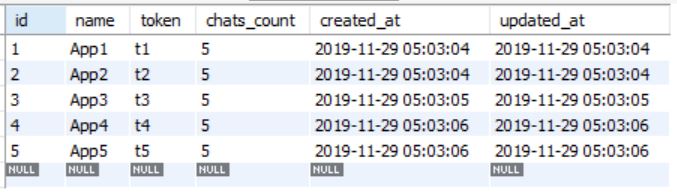
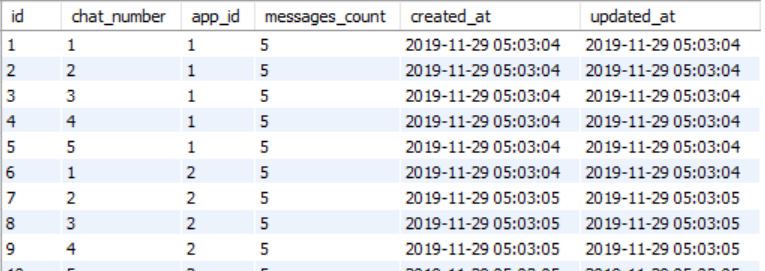
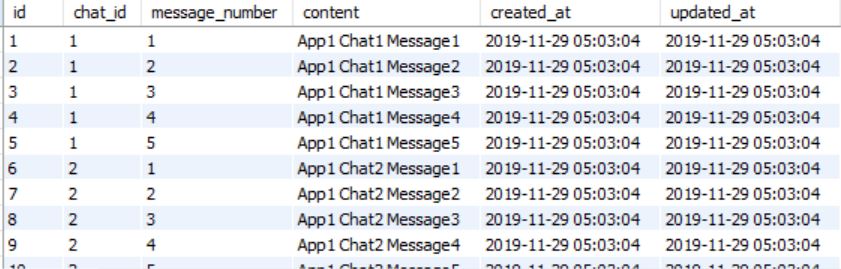
You can run docker-compose run app with the task rails db:seed to input the following seed data into the DB. (Do that after you are completely done with starting the server)
Applications Seed Data Sample

Chats Seed Data Sample

Messages Seed Data Sample

Leave a Reply